A Visual FoxPro replacement you can open right now.
Flat pricing, unlimited users, no per-seat fees — and no sales call to find out whether it's any good. The button below opens a real, working database in your browser: Microsoft's own Northwind sample, rebuilt in Bionic Forms, with its customers, orders and line items all wired together. No signup, no email, nothing to install.
Where this is up to
- Works today, on any OS, in your browser — nothing to install, and there are desktop apps for macOS, Windows and Linux as well.
- Windows is a download now; there is no iPhone or Android app yet. The Windows app is not code-signed yet, so the first time you run it Windows shows a blue “Windows protected your PC” box — click More info, then Run anyway. Some antivirus flags it for the same reason. A certificate is bought, not written, and we would rather ship the app and say this plainly than keep you waiting on a purchase order. The phone apps get built the moment someone needs them.
- Offline is a desktop feature. The encrypted local database ships with the desktop app — macOS, Linux and Windows. In the browser it is not true: that needs a connection, and I'd rather say so here than have you find out on a train.
- The local database file is encrypted on disk (adiantum full-file encryption), and the key lives in your operating system's own secure store rather than in the file.
- I'm not going to pretend this is urgent. Microsoft ended Visual FoxPro support in 2015, so if yours still runs, it runs — plenty do. The question is only what happens the day it stops, or the day the person who maintains it moves on.
- Calculation fields do not calculate yet. Collections, fields, links between records, screens and permissions all work. A calculated field can be created and labelled, but nothing works out the value, so it shows as empty with a note saying why. If the worth of your app is mostly in its calculations, that is worth knowing before you move anything rather than after.
What it actually looks like
Both of these are the CRM template as it ships — one click from an empty account, no setup. They are screenshots of the running product, not mockups.
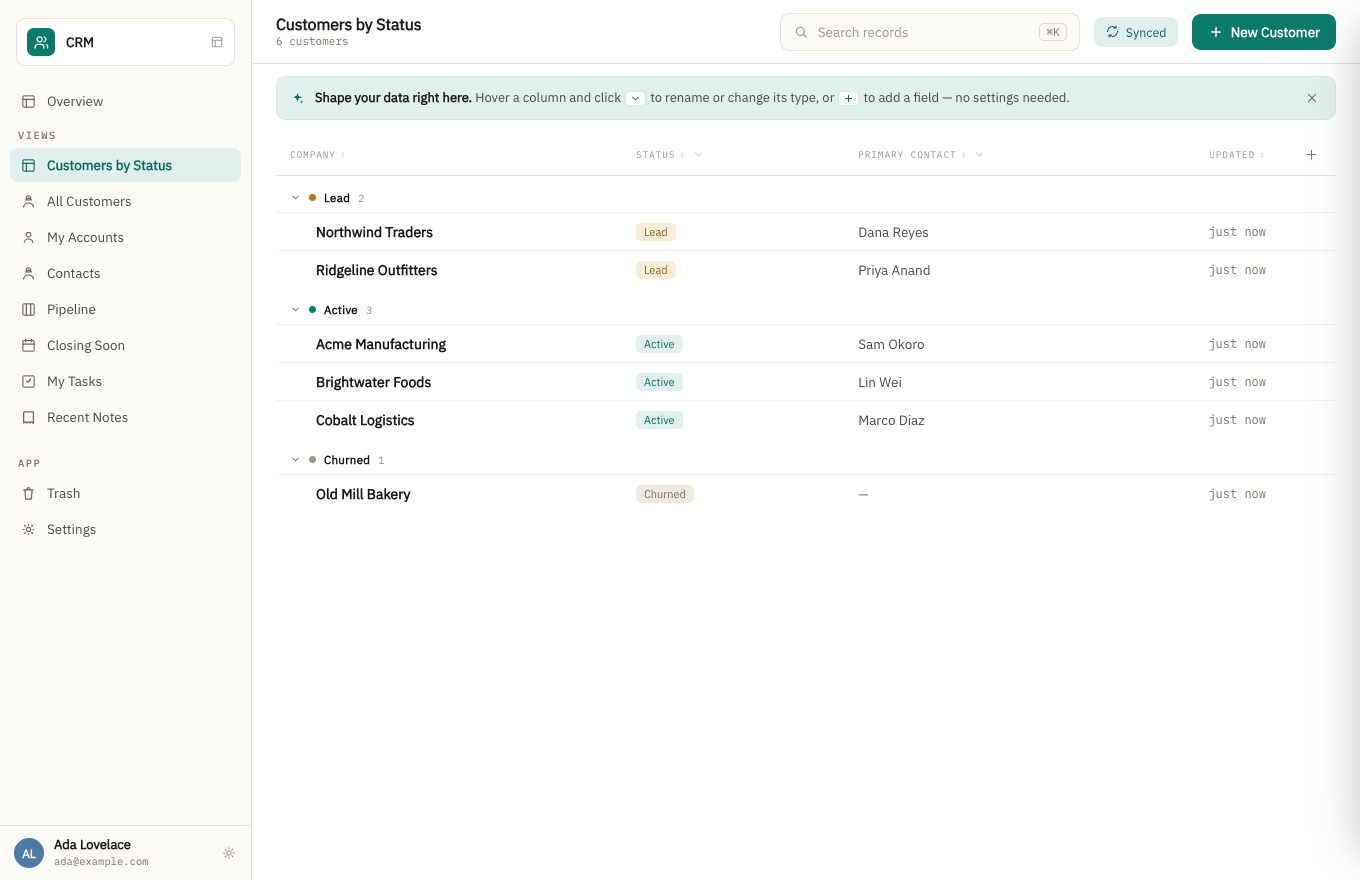
A grouped list view. Fields are changed in the app’s settings, or by asking the assistant, never by accident from the list.
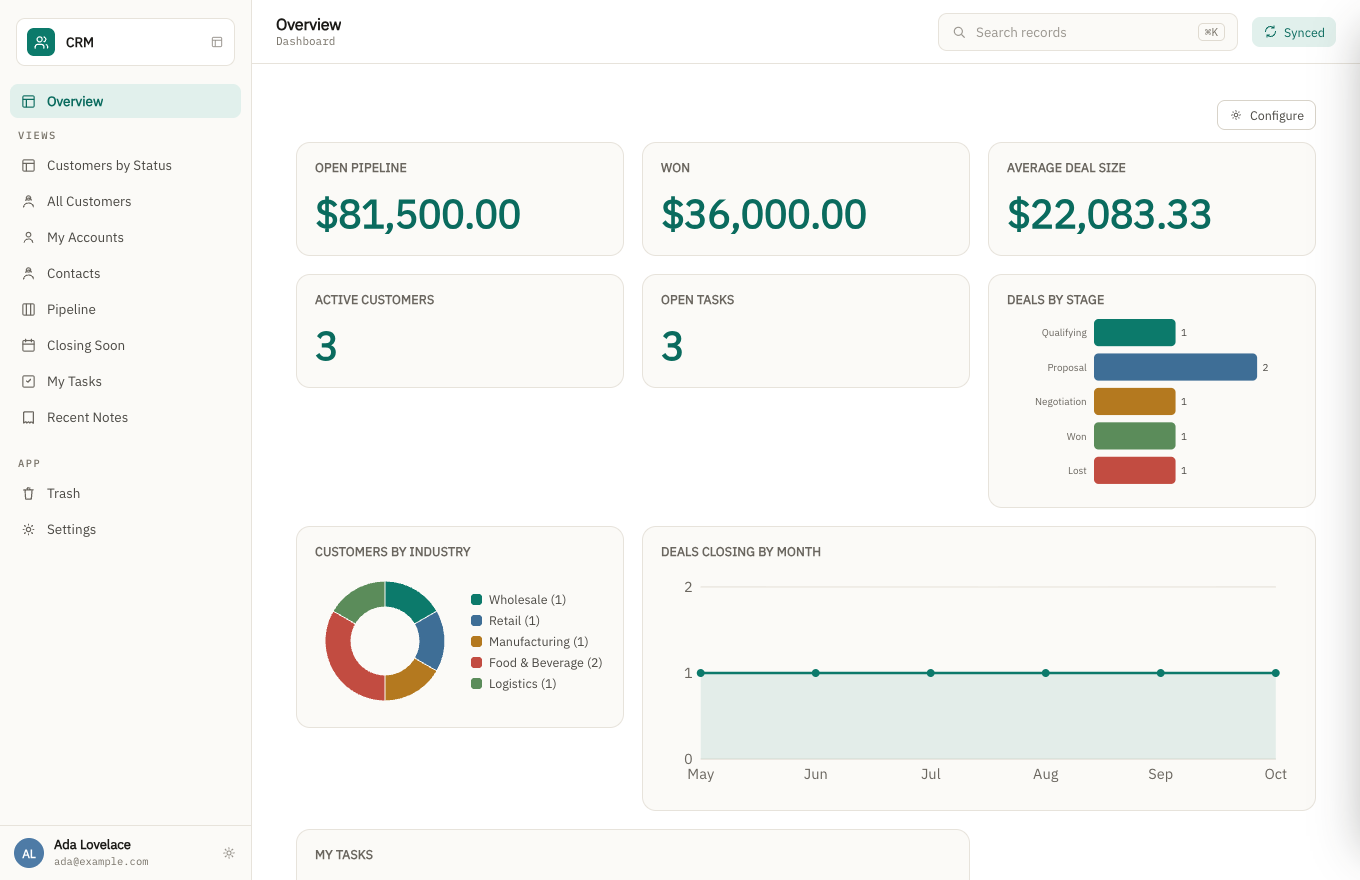
The same app's dashboard. The charts read live from the records above, not a separate reporting tool.
How the pricing works
Flat, by what you build — never by how many people use it. Add the whole team, the contractor, the client who needs read access: the price doesn't move.
What happens when the person who built it leaves?
That's the question this is really built around, and it's the one I'd genuinely like to hear your answer to. A departmental app usually outlives the person who wrote it, and what's left behind is often a file nobody can safely change.
- The app is described, not codedDoc types, fields, views and workflows are structured definitions — the next person reads what it does instead of reverse-engineering a script.
- Every change is a revisionRecords keep their history, so "who changed this, and when" has an answer after the original author is gone.
- The data is a database on your machineOffline-first and encrypted, syncing when it can. If my company disappeared tomorrow, the file wouldn't.
- Roles are part of the appPermissions live in the app definition, so handing it over doesn't mean rebuilding who can see what.
Visual FoxPro has been out of support since January 2015
Microsoft’s own lifecycle database gives the dates plainly: Visual FoxPro 9.0 ended support on 13 January 2015, and Visual FoxPro 8.0 Professional on 9 April 2013. There is no successor product. Microsoft did not replace FoxPro with anything; it simply stopped.
That is over eleven years without a security fix, a bug fix or a supported path onto a new Windows release from Microsoft.
The community, though, did not stop, and it would be dishonest of me to imply otherwise. VFPX is still going: 117 repositories, with VFPXFramework updated on 10 August 2026, PEMEditor in June 2026, and — the one that says most about who is still out there — VFPRuntimeInstallers, also June 2026. People are not merely reminiscing about VFP. They are still deploying it. (Read from github.com/VFPX on 29 August 2026; go and look, the dates are public.)
So the argument for moving is not that FoxPro is abandoned, because in the sense that matters to a developer it is not. It is narrower than that. Volunteer maintenance of tooling is not a supported platform, and more to the point it does not touch the thing that actually strands a business: an actively maintained ecosystem is no help to you the day the one person who understands your .prg files stops answering the phone.
The honest part: it still works, and that is exactly the problem. A FoxPro application that has been fine for a decade sets its own trap, because the pressure to move never arrives as a crash. It arrives as a new PC that will not run it, an ODBC driver that is no longer shipped, a Windows update that changes something underneath, or the retirement of the one person who understands the .prg files. None of those give notice.
Will Visual FoxPro run on Windows 11?
Generally, yes — and most pages that tell you otherwise are selling you something. I would rather you heard the real answer from me even though the scary version would suit me better.
Visual FoxPro 9 is a 32-bit application, and 64-bit Windows 11 runs 32-bit applications through
its WOW64 compatibility layer. VFP 9 and applications built with it generally install and run.
The failure people hit most often on a fresh machine is a permissions problem rather than a
compatibility one: developers report that installing into C:\Program Files causes
trouble, and that installing somewhere else avoids it. That is what practitioners say in public
— on the West Wind support forum and the Tek-Tips FoxPro forum, read 29 August 2026 —
not something I have reproduced on your machine, so treat it as a starting point rather than
instructions.
So what is actually true is narrower, and worth stating without the drama. Microsoft issued no bug fix and no security fix for VFP after extended support ended on 13 January 2015, so nothing about it is being tested against each Windows release. It works because the compatibility layer keeps working, not because anyone is checking. That is a real exposure and a poor reason to panic. If your application runs today, it will very probably run tomorrow.
Which is exactly why the Windows question is the wrong one to plan around. The thing that actually strands a business is not an operating system release. It is the morning nobody left can open the .prg files, and no compatibility layer has ever helped with that.
What actually makes a FoxPro migration different
Two things, and neither is the data:
The data is the easy part, genuinely. DBF is an old, simple, well-understood format. Getting tables out of a FoxPro application is the least of the work — a CSV export per table gets you most of the way, and unlike some newer systems there is no vendor deciding what you may take.
The logic is the whole job. FoxPro was a language as much as a database, and in most surviving applications the business rules live in .prg code and screen logic rather than in the tables. That does not export. Moving means the rules get re-expressed, so the real first task is not a migration tool — it is finding out what the application actually does, which is often knowledge that exists only in one person’s head. Write it down before that person leaves, whatever you decide to move to.
And the index files are not your data. CDX and IDX files are derived; if a migration plan treats them as content to preserve, it is a plan written by someone who has not done this. What you need out is the DBF tables and the memo (FPT) files that go with them — a memo field left behind is silently empty text, and it is usually where the notes live.
Support dates verified on Microsoft’s own product lifecycle database on 21 August 2026, not taken from a third party. We have an obvious interest in you moving, so it is worth saying plainly: nothing about your application stops working because a support date passed years ago, and anyone using those dates to rush you is selling.
What you can do yourself, today
You don't have to wait for anyone to move your data, and you don't need a working copy of FoxPro to
get it out. The app reads a .dbf table as it is — FoxPro 2.x, Visual FoxPro, dBase or
Clipper: drop it in and it builds a collection in one step — a field per column, each typed from what the column actually holds (dates as dates, amounts as numbers, a column of a few repeated values as a dropdown), named from your data, with a meter while the rows go in. Anything it typed wrong you change afterwards in the app's settings.
One limit, and it is the memo fields. Their text lives in the separate .fpt file, and the app
does not read that yet. If a table has memo fields with anything in them, it tells you which ones and
imports nothing, rather than bringing the table in with the notes missing. For those tables, export a CSV
from FoxPro instead (COPY TO with TYPE CSV, or DELIMITED on older
versions), or send us both files and we will load them for you.
Where it can't tell, it asks rather than guesses. A column of dates like 03/04/2026 could be
the 3rd of April or March 4th, and the rows it would get wrong look exactly like the rows it would get
right — so it stops and asks you which, and won't import until you answer. If one value anywhere in the
file can't be read, nothing is imported at all: a half-loaded collection is worse than an empty one,
because you can't tell which records made it and running it again duplicates the ones that did.
Import your tables into the same app, one file after another and in any order, and it looks for the links between them — an order that names a customer ID gets connected to its customer, so you can open one and see the other. It only links where both the column name and every value agree; where it isn't sure, it leaves the values alone rather than guessing.
Where it stops: it moves data. It does not convert screens, reports or PRG code. Those are a rebuild, done in the app itself — this just means your records can be in front of you in a couple of minutes rather than waiting on that.
And an export is only half of getting your data in. The other half is the people who do not work for you. Any collection can be opened as a public form at its own link — plain HTML that works on any phone with no JavaScript, so it survives an old browser or a QR code taped to a wall, and it closes on a date or after a set number of entries. A FoxPro system has no answer to this at all: the data lives on a share nobody outside the office can reach, so the outside world arrives as paper, email or a phone call and somebody retypes it. Entries arrive as ordinary records with full history, marked as coming from the form.
You choose which fields the page asks for, and the ones you keep for yourself — turned up, paid, your own notes — are not on it. That much is cosmetic, and a field name is guessable. What is actually true is that the server refuses a field the door did not ask for, so a stranger who guesses the name still cannot set it.
What this is not
It isn't a Visual FoxPro importer — there's no automatic conversion of an existing application, and I'm not going to pretend a rebuild is a click. It isn't a spreadsheet, it isn't a form builder, and it isn't finished software with a track record. It's an honest early product with a pricing model that doesn't punish you for adding people, and I'm looking for a handful of people willing to tell me where it falls short.
And the question you should be asking a company this small: what happens to your data if we go out of business? Microsoft walked away from Visual FoxPro, so you have earned the right to ask. The answer, with the mechanism and its limit.
What it costs to find out
Nothing, and there is no call to book. Open the demo, click around a real database, and decide for yourself. If you want your own, the free tier is genuinely free and takes a minute.
When you are ready to bring your own data, the app reads your .dbf tables (or a CSV) directly and works out how your tables relate to each other — that is the part described above, and it is self-serve. You do not need me for it.
Or do not build it yourself. Describe the app your business runs on and we will build a working version of it and show you — no fee, no card, and the app we build fits the free plan. How that works.
Still comparing? I wrote up every Visual FoxPro replacement I could find, including the ones that beat this one: Xbase++ and PolarFox if you want to keep the code, FoxInCloud if people just need it from somewhere else, and a straight .NET rewrite when the logic really is the asset. It starts with the question that decides which half of the list applies to you.
Bionic Forms is built by Matt Bidwell (Bionics LLC). If something here reads as overclaiming, tell me and I'll fix the page — that's a promise I can actually keep at this stage. Either way you can reach me at matt@bidwellhq.com.