A Notion alternative for the database that became the business.
Notion is a fine place for pages. The trouble starts when one of its databases quietly becomes the system the business runs on: the free plan stops adding blocks the moment a second person joins, the paid plans are priced by the seat, and a big database with rollups gets slow. Export the database as CSV, drop it below, and get the same records back as a database your whole team can open — in the browser on any OS, or the desktop app on macOS, Windows and Linux — with flat pricing and no seat count in the price. Keep Notion for the pages.
Where this is up to
- Works today, on any OS, in your browser — nothing to install, and there are desktop apps for macOS, Windows and Linux as well.
- Windows is a download now; there is no iPhone or Android app yet. The Windows app is not code-signed yet, so the first time you run it Windows shows a blue “Windows protected your PC” box — click More info, then Run anyway. Some antivirus flags it for the same reason. A certificate is bought, not written, and we would rather ship the app and say this plainly than keep you waiting on a purchase order. The phone apps get built the moment someone needs them.
- Offline is a desktop feature. The encrypted local database ships with the desktop app — macOS, Linux and Windows. In the browser it is not true: that needs a connection, and I'd rather say so here than have you find out on a train.
- The local database file is encrypted on disk (adiantum full-file encryption), and the key lives in your operating system's own secure store rather than in the file.
- Notion is a more finished product than this one, and I am not going to pretend otherwise. It has pages, wikis, a vast template ecosystem and years of polish. What I am claiming is narrower: a database that is a file on your own machine rather than only rows in someone else’s, a form for the person who only ever adds records, and a price with no seat count in it. If what you need is the pages, keep Notion for the pages and bring the database.
- Calculation fields do not calculate yet. Collections, fields, links between records, screens and permissions all work. A calculated field can be created and labelled, but nothing works out the value, so it shows as empty with a note saying why. If the worth of your app is mostly in its calculations, that is worth knowing before you move anything rather than after.
What it actually looks like
Both of these are the CRM template as it ships — one click from an empty account, no setup. They are screenshots of the running product, not mockups.
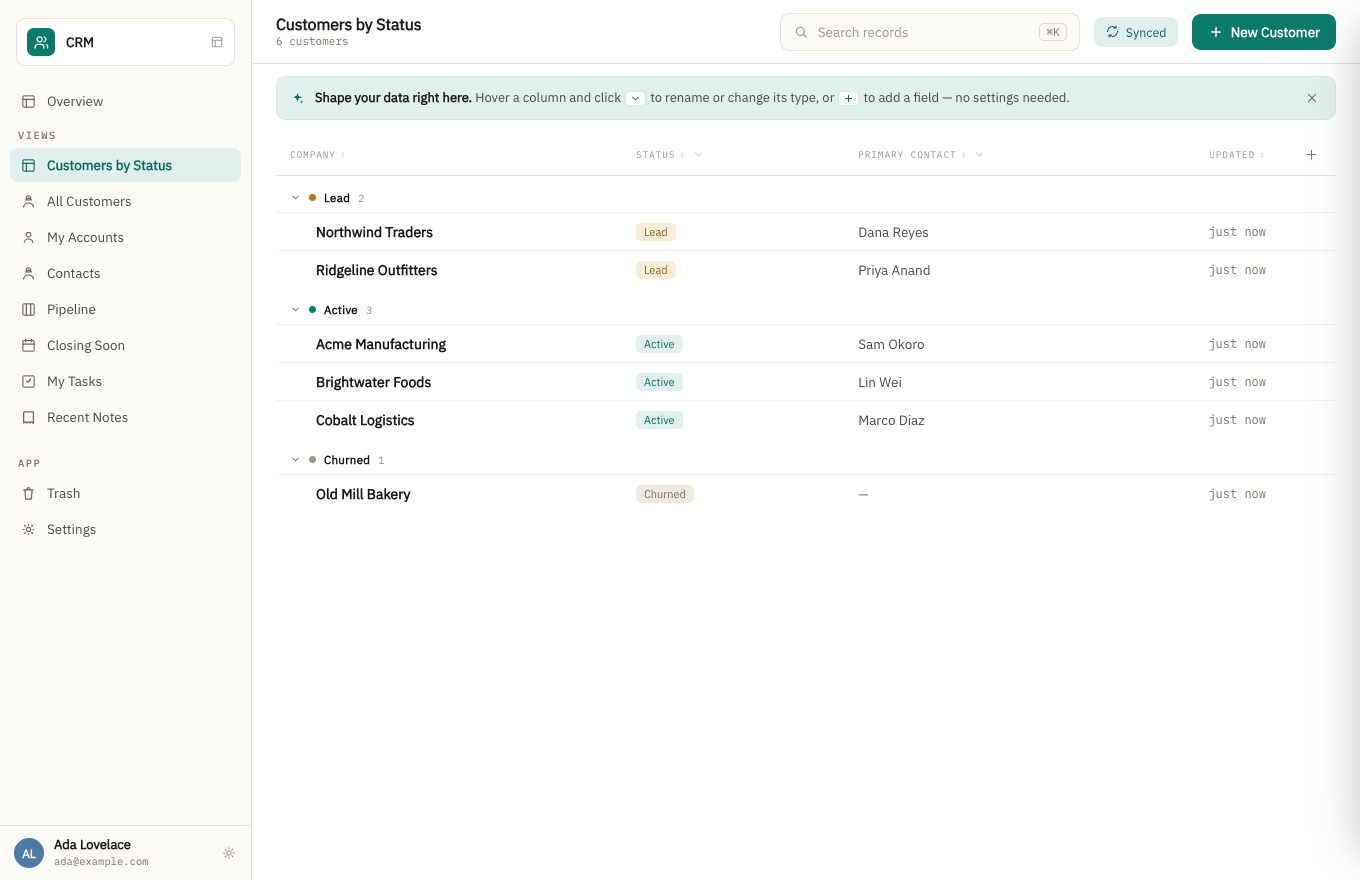
A grouped list view. Fields are changed in the app’s settings, or by asking the assistant, never by accident from the list.
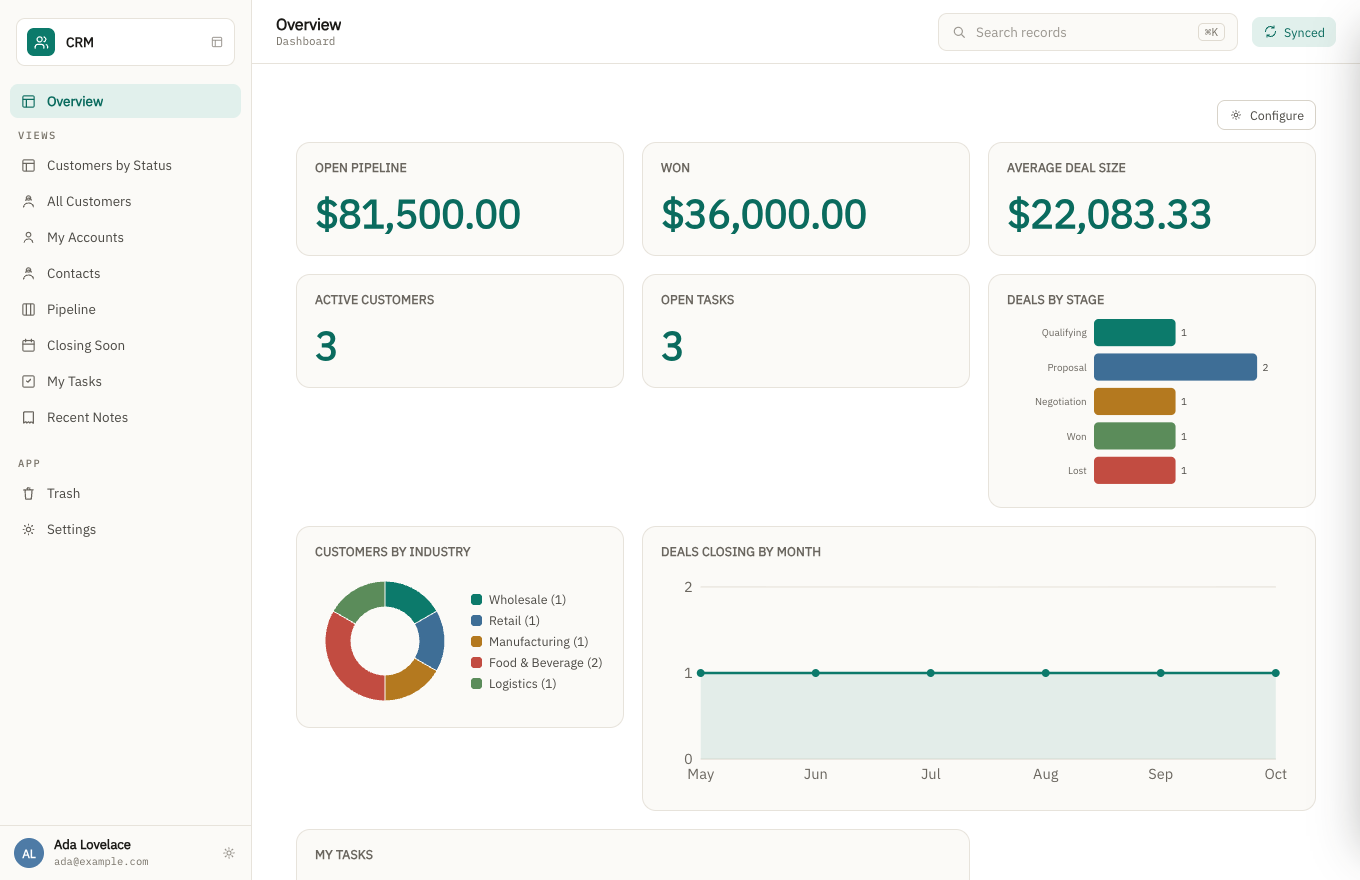
The same app's dashboard. The charts read live from the records above, not a separate reporting tool.
How the pricing works
Flat, by what you build — never by how many people use it. Add the whole team, the contractor, the client who needs read access: the price doesn't move. If you've been doing per-seat arithmetic before adding anyone, that's the habit this pricing is built to break.
What happens when the person who built it leaves?
That's the question this is really built around, and it's the one I'd genuinely like to hear your answer to. A departmental app usually outlives the person who wrote it, and what's left behind is often a file nobody can safely change.
- The app is described, not codedDoc types, fields, views and workflows are structured definitions — the next person reads what it does instead of reverse-engineering a script.
- Every change is a revisionRecords keep their history, so "who changed this, and when" has an answer after the original author is gone.
- The data is a database on your machineOffline-first and encrypted, syncing when it can. If my company disappeared tomorrow, the file wouldn't.
- Roles are part of the appPermissions live in the app definition, so handing it over doesn't mean rebuilding who can see what.
The seat is the number that grows, and the free plan ends at the second person
Notion prices by the person. Its own plans page lists Plus at $10 per seat per month and Business at $20 per seat per month, both billed annually ($12 and $24 month to month), and the free plan’s 1,000-block limit applies the moment a workspace has two or more members — existing content stays readable and editable, new blocks stop. Checked on 31 August 2026 at notion.com/pricing; their prices move, so check yours.
The other limit is speed. Notion’s own help page on database performance says a database with many pages, many visible properties, or sorts and filters on formula and rollup properties loads more slowly, and recommends splitting large databases. Read on 31 August 2026 at notion.com/help. A database that became the operations record is exactly the one that grows into that.
| People who can edit | Notion Plus $10/seat/mo | Notion Business $20/seat/mo | Bionic Forms |
|---|---|---|---|
| 1 | $10/mo | $20/mo | $29/mo — or $0 |
| 3 | $30/mo | $60/mo | $29/mo |
| 6 | $60/mo | $120/mo | $29/mo |
| 12 | $120/mo | $240/mo | $29/mo |
| 25 | $250/mo | $500/mo | $29/mo |
At one or two people Notion is cheaper, and if that is your whole team you should probably stay. From three people onward the arithmetic goes the other way and keeps going; the free tier here has no seat count at all and holds 10,000 entries an app.
What you can do yourself, today
You don't have to wait for anyone to move your data. Notion exports each database as CSV (the Markdown & CSV export puts every database in the zip as its own .csv), and the app reads one directly: drop it in and it builds a collection in one step — a field per column, each typed from what the column actually holds (dates as dates, amounts as numbers, a column of a few repeated values as a dropdown), named from your data, with a meter while the rows go in. Anything it typed wrong you change afterwards in the app's settings.
Where it can't tell, it asks rather than guesses. A column of dates like 03/04/2026 could be
the 3rd of April or March 4th, and the rows it would get wrong look exactly like the rows it would get
right — so it stops and asks you which, and won't import until you answer. If one value anywhere in the
file can't be read, nothing is imported at all: a half-loaded collection is worse than an empty one,
because you can't tell which records made it and running it again duplicates the ones that did.
Import your tables into the same app, one file after another and in any order, and it looks for the links between them — an order that names a customer ID gets connected to its customer, so you can open one and see the other. If your Notion workspace is a handful of related databases, that's the shape it recreates. It only links where both the column name and every value agree; where it isn't sure, it leaves the values alone rather than guessing.
Where it stops: it moves data. It does not convert forms, reports, pipelines or formula fields. Notion’s pages, buttons, automations and formulas have nothing to be imported into, and a relation cell arrives as the linked pages’ titles rather than as a live link unless the importer can match them against a collection you loaded first. Those are a rebuild, done in the app itself — this just means your records can be in front of you in a couple of minutes rather than waiting on that.
What this is not
It isn't a Notion importer — there's no automatic conversion of an existing workspace, and I'm not going to pretend a rebuild is a click. It isn't a spreadsheet, it isn't a form builder, and it isn't finished software with a track record. It's an honest early product with a pricing model that doesn't punish you for adding people, and I'm looking for a handful of people willing to tell me where it falls short.
What it costs to find out
Nothing, and there is no call to book. Open the demo, click around a real database, and decide for yourself. If you want your own, the free tier is genuinely free and takes a minute — and putting the rest of the team on it doesn't change the price.
When you are ready to bring your own data, Notion exports CSV and the app reads it directly, working out how your tables relate to each other — that is the part described above, and it is self-serve. You do not need me for it.
Or do not build it yourself. Describe the app your business runs on and we will build a working version of it and show you — no fee, no card, and the app we build fits the free plan. How that works.
Bionic Forms is built by Matt Bidwell (Bionics LLC). If something here reads as overclaiming, tell me and I'll fix the page — that's a promise I can actually keep at this stage. Either way you can reach me at matt@bidwellhq.com.