An Access alternative that starts with your export.
Access 2016 and 2019 are already out of support; Access 2021 follows on 13 October 2026, and
what that does and does not mean is set out further down. Export a table to a
.csv, drop it below, and get the same records back as a database your whole team can open
— in the browser on any OS, or the desktop app on Windows, macOS and Linux — with flat pricing,
unlimited people and no per-user licence.
If you have already looked at Power Apps, Microsoft Lists or SharePoint and come away thinking they turn something simple into a project, that is the gap this is built for. I have priced every alternative I could find against the $0 you already pay, including the cases where Lists is genuinely the right answer and where keeping Access is.
Where this is up to
- You run Access, so you're on Windows — and the desktop app is a download now. It is not code-signed yet, so the first time you run it Windows shows a blue “Windows protected your PC” box — click More info, then Run anyway. Some antivirus flags it for the same reason. If clicking through that is a no for you or your IT policy, the browser version works on any OS with nothing to install and is the same app. The phone apps get built the moment someone needs them.
- Offline is a desktop feature. The encrypted local database ships with the desktop app — macOS, Linux and Windows. In the browser it is not true: that needs a connection, and I'd rather say so here than have you find out on a train.
- The local database file is encrypted on disk (adiantum full-file encryption), and the key lives in your operating system's own secure store rather than in the file.
- I'm not going to tell you Access is dying. It isn't — it still ships, and if it works for you there is no reason to move. Microsoft publishes its own guidance on migrating an Access database when it outgrows the format; this is a different answer to the same moment, not a warning about your software. The only thing I'm claiming is a different pricing model and a different shape of app.
- Calculation fields do not calculate yet. Collections, fields, links between records, screens and permissions all work. A calculated field can be created and labelled, but nothing works out the value, so it shows as empty with a note saying why. If the worth of your app is mostly in its calculations, that is worth knowing before you move anything rather than after.
What it actually looks like
Both of these are the CRM template as it ships — one click from an empty account, no setup. They are screenshots of the running product, not mockups.
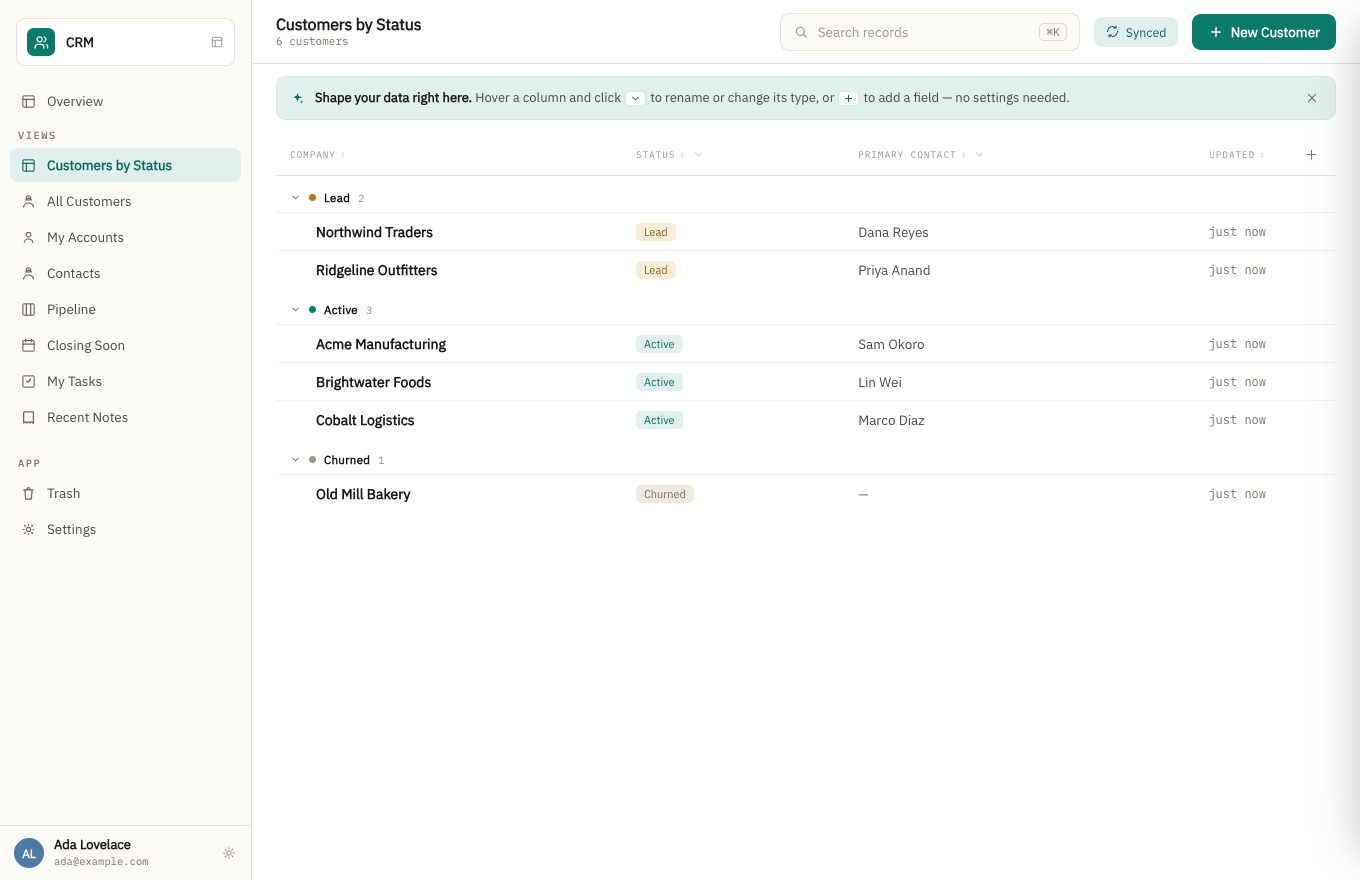
A grouped list view. Fields are changed in the app’s settings, or by asking the assistant, never by accident from the list.
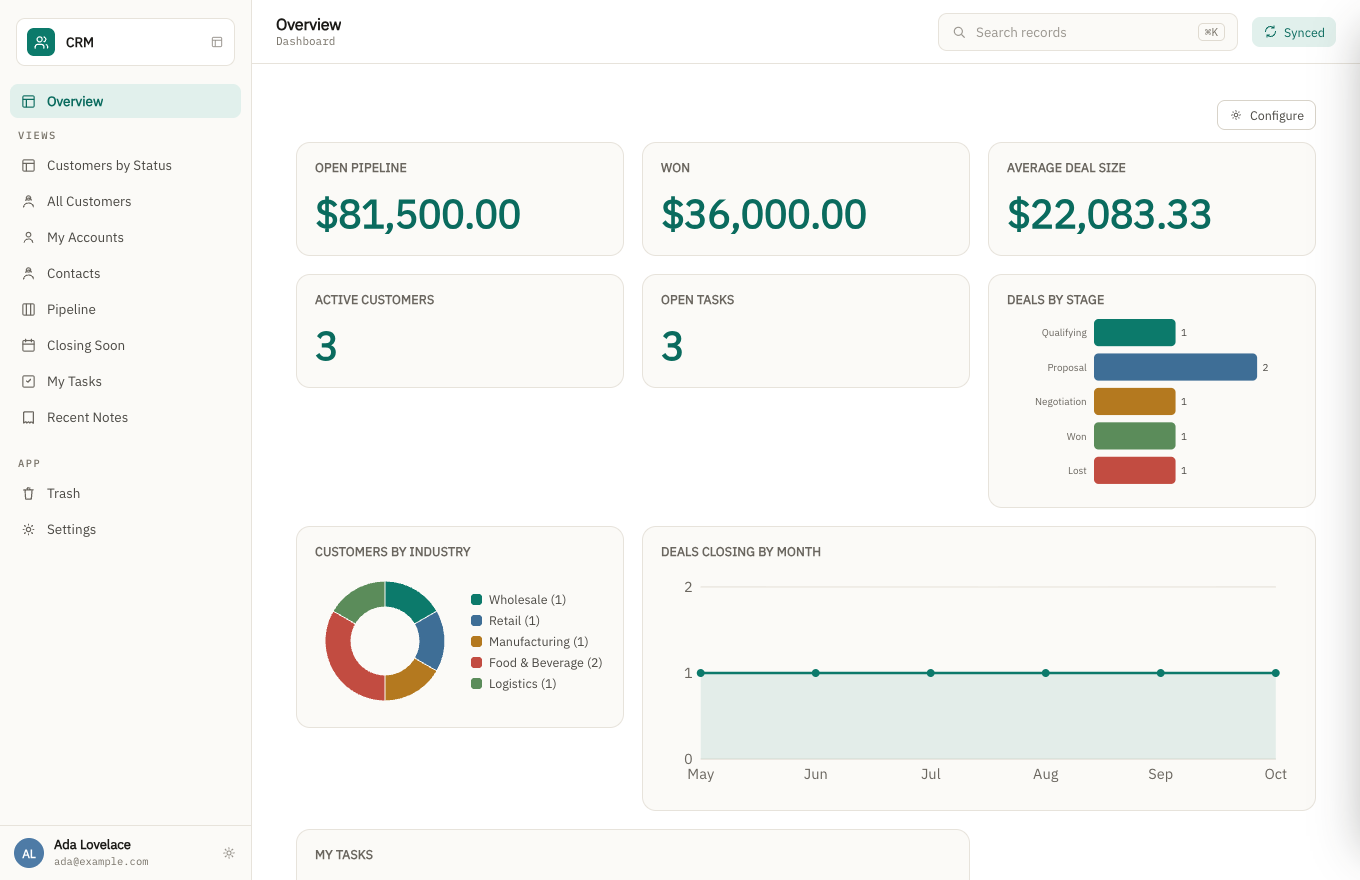
The same app's dashboard. The charts read live from the records above, not a separate reporting tool.
The same records, six ways. A table, cards, a kanban board, a calendar, a timeline, and a map. You are not picking one and losing the others — a view is a way of looking, so the same customers can be a list on Monday and a map on Tuesday. Three of those key off a particular kind of field, which is worth knowing before you import rather than after: the map places each record by its address field, so put anything postal in an address field rather than a plain text box; a board’s lanes come from a choice field like status; and a calendar or timeline uses the first date field on the form. Field types are changed afterwards in settings, so none of this is a decision you are stuck with.
Before you move anything, it is worth knowing exactly what an Access export takes with it and what it leaves: we collected what Microsoft documents about its own export, quoted and linked.
How the pricing works
Flat, by what you build — never by how many people use it. Add the whole team, the contractor, the client who needs read access: the price doesn't move.
What happens when the person who built it leaves?
That's the question this is really built around, and it's the one I'd genuinely like to hear your answer to. A departmental Access database usually outlives the person who wrote it, and what's left behind is often an .accdb nobody can safely change.
- The app is described, not codedDoc types, fields, views and workflows are structured definitions — the next person reads what it does instead of reverse-engineering someone else's VBA.
- Every change is a revisionRecords keep their history, so "who changed this, and when" has an answer after the original author is gone.
- The data is a database on your machineOffline-first and encrypted, syncing when it can. If my company disappeared tomorrow, the file wouldn't.
- Roles are part of the appPermissions live in the app definition, so handing it over doesn't mean rebuilding who can see what.
What actually happens to Access on 13 October 2026
Microsoft’s lifecycle database lists Access 2021 and Access LTSC 2021 as both ending support on 13 October 2026, alongside the rest of the Office 2021 family — Office 2021, Office LTSC 2021, Office LTSC 2021 for Mac and Excel 2021 all carry the same date. Access 2016 and Access 2019 already left support on 14 October 2025.
Your database does not stop working, and anyone telling you otherwise is selling something. And before anyone offers to sell you time: there is no Extended Security Updates programme for Office 2021. Windows 10 had one, so people reasonably assume Office does too. Microsoft has said explicitly that it does not, and that the date will not move. (Checked against Microsoft’s own end-of-support notice on 29 August 2026.) The fuller version of this, including the editions that do not contain Access at all. Microsoft’s own wording is that the apps “will continue to function, but you could be exposed to security risks”. What ends is security updates, bug fixes and support — not the software. On 14 October your .accdb opens exactly as it did the day before.
So the honest version of the deadline is narrower than the headlines: it is a date on which an unpatched Office component starts handling your business data, and on which most IT policies stop allowing it. If you are on Microsoft 365 rather than a one-time 2021 licence, none of this applies to you at all.
Two reasons it is worth a thought anyway, neither of them panic. The first is that the upgrade is not free: moving everyone to Office 2024 or a Microsoft 365 subscription is a per-person cost you are about to pay for a database that already corrupts when several people share it and stops at 2 GB and 255 users. The second is that a forced decision is a cheap moment to ask whether the file should still be the system — not because Access is ending, but because you are being asked to re-buy it.
Dates verified on Microsoft’s own lifecycle database and support pages on 21 August 2026, not taken from a third party. We have an obvious interest in you moving, which is why the paragraph above says plainly that nothing breaks on the day.
The deadline is not why most people leave
Two limits do most of the pushing, and neither has anything to do with a support date.
An Access database file stops at 2 GB. That is Microsoft’s own documented maximum, and it counts everything — the data, plus every table, query, form and report in the file. It has been 2 GB for as long as anyone reading this has used Access. There is a real workaround: split the data across linked files, each with its own 2 GB. It works, and the reason people stop doing it is that the split is now a thing somebody has to understand and maintain forever.
And a shared file gets fragile before it gets full. Microsoft documents a ceiling of 255
concurrent users, and almost nobody who has run a shared .accdb would put a real
office anywhere near it. We are not going to invent a number for you: what practitioners report
is that trouble starts far below the documented limit, and the trouble is the one described in
the next section.
Two more questions come up again and again once the team is not all in one room. Someone in another office or at home needs the same data: we wrote up what Microsoft offers for people in other places, and why a file on OneDrive is not one of them. And someone needs to work with no signal and send their changes back later: how people run Access offline, now that replication has been removed.
The 2 GB figure and the 255-user ceiling are Microsoft’s published specifications. The claim that problems start well below 255 is practitioner experience, ours included, and we have labelled it as that rather than dressing it up as a specification.
What happens when two people change the same record?
It is the second question anybody asks after “does it work offline”, and for an
Access user it is the sharpest one, because the shared-.accdb answer is either
last-save-wins or a corrupted file.
Different fields on the same record merge silently. You change the delivery date while someone else changes the phone number, and both edits survive with nobody consulted. That is a three-way merge against the version you both started from, not a guess.
That silent merge is what happens when apps sync — two desktops, or a desktop and this browser catching up with each other. Two people typing in the browser at the same moment are not merged field by field. The second save is refused, you are told somebody saved while you were editing, your typing is still on the screen, and saving again keeps yours and replaces theirs. Nothing is destroyed — their version stays in the record’s history — but you are the one deciding, not the merge.
The same field, changed two different ways, is not decided for you. Both values are kept, the record is flagged, and a person chooses. Nothing is silently discarded and every version stays in the record’s history, so the losing edit is still there afterwards. The longer version of this is on its own page.
The cost, because a claim without one is an advert. Somebody gets interrupted — a flagged record is a small job for a human. And this is not live co-editing: two people typing into the same paragraph at the same time is a document-shaped problem, and you should use a document for it.
If you go out of business, what happens to my data?
You are asking because the last people who ran your database walked away from it. It is the right question to ask a one-person company that has not launched, and it deserves a mechanism rather than a promise.
Two buttons, both there now. Export gives you a JSON file containing the
design and every record — plain text, readable in any editor, no tool of ours required to
open it. Export .zip gives you the same JSON plus the actual bytes of every
attachment, which is the one that is genuinely all of it. Every document carries an attachment
manifest even in the plain JSON, so the smaller export tells you what it is not carrying instead
of quietly leaving it out.
And on the desktop the question barely arises, because the data is already a file on your own machine — an encrypted SQLite database in your own profile directory, with the key in your operating system's secure store. If this company stopped existing tomorrow, that file would still be sitting there.
The limit, said plainly, because this is exactly where a vendor would stop talking. An export hands you your data and a description of the design. It does not hand you a running application. Without software that reads it you have your records, your relationships and your field definitions in a form any developer can work with — which is a great deal more than a dead .accdb gives you, and still not the same thing as your app continuing to run.
What you can do yourself, today
Moving your records is self-serve, and it doesn't need a conversation first. Access exports CSV, and the app reads one directly: drop it in and it builds a collection in one step — a field per column, each typed from what the column actually holds (dates as dates, amounts as numbers, a column of a few repeated values as a dropdown), named from your data, with a meter while the rows go in. Anything it typed wrong you change afterwards in the app's settings.
Where it can't tell, it asks rather than guesses. A column of dates like 03/04/2026 could be
the 3rd of April or March 4th, and the rows it would get wrong look exactly like the rows it would get
right — so it stops and asks you which, and won't import until you answer. If one value anywhere in the
file can't be read, nothing is imported at all: a half-loaded collection is worse than an empty one,
because you can't tell which records made it and running it again duplicates the ones that did.
Import your tables into the same app, one file after another and in any order, and it looks for the links between them — an order that names a customer ID gets connected to its customer, so you can open one and see the other. It only links where both the column name and every value agree; where it isn't sure, it leaves the values alone rather than guessing.
Where it stops: it moves data. It does not convert forms, reports, macros, VBA or queries. Those are a rebuild, done in the app itself — this just means your records can be in front of you in a couple of minutes rather than waiting on that.
And an export is only half of getting your data in. The other half is the people who do not work for you. Any collection can be opened as a public form at its own link — plain HTML that works on any phone with no JavaScript, so it survives an old browser or a QR code taped to a wall, and it closes on a date or after a set number of entries. So the volunteers, applicants or customers who fill in half your records can do it themselves, rather than somebody retyping an emailed Word form into Access. Entries arrive as ordinary records with full history, marked as coming from the form.
You choose which fields the page asks for, and the ones you keep for yourself — turned up, paid, your own notes — are not on it. That much is cosmetic, and a field name is guessable. What is actually true is that the server refuses a field the door did not ask for, so a stranger who guesses the name still cannot set it.
There is no VBA. Here is exactly what there is instead.
Saying "no scripting language" and stopping there is not an answer, so this is the whole list. Automation is a fixed catalogue: you write what should happen as a sentence, it is compiled from that catalogue, and none of it is code you write. Seven things can start a workflow: a record is created, a record is updated, a record is deleted, a schedule, the app opening, a sync finishing, or you pressing a button.
And eight things can happen as a result: create a record, update a record, look records up, notify someone in the app, send an email, call a webhook, generate a PDF, or ask the AI a question about your data.
That covers a great deal of what VBA is doing in a typical Access application — stamping a field on save, chasing an overdue job, mailing a confirmation, producing the document somebody has to sign. You set each one up by writing it as a sentence (“every time an order ships, email the customer”), either in the description you build the app from or later on its own; it is read back to you in plain words and can be tried on a real record, sending and writing nothing, before it is switched on. So there is no module for one person to become the only owner of.
Now the part that decides it for you. If what you need is not on those two lists, there is no escape hatch. You cannot drop into code for the last five percent, because there is nowhere to drop into. An operation outside that catalogue is rejected rather than run. If your Access application earns its keep through calculations, pricing rules, or logic that took years to get right, that logic has nowhere to go here and a rebuild in something programmable is the honest recommendation — from us, in writing, before you spend an afternoon.
Your user group has spent the year on AI. This is the other answer.
If you follow the Access user groups you have sat through a lot of AI lately — Copilot and Claude and ChatGPT writing VBA, an MCP server wired into Visual Studio Code, agents working under a human project manager. Access Pacific gave a whole meeting to it in March and landed where most of those rooms land: it helps, and somebody still has to check everything it writes.
That is a fair conclusion, and it is exactly why the AI in this product works the other way round. It does not write you VBA. It changes the app, and it shows you the change before it makes it.
Ask for a delivery date on orders, shown on the list, and you get a card back: the field it means to add, the type it picked, the view it will appear on. Apply, adjust, or cancel. Nothing has moved until you press the button. Drop a .csv in and it imports in one step — every column typed only from what all of its values support — and stops to ask before writing only when a date could read either way.
So there is no code to review, because there is no code. What there is to review is a plain description of what is about to change, in the same words you used to ask for it.
The whole vocabulary, so you can judge it rather than take my word: add, change and remove fields; add and remove collections; add, change and remove views and dashboards; change what search looks at; rename the app; set who can see and change records; set up a workflow from a sentence; and add, change or delete records, each shown to you before it happens. Ask for something outside that and it says it cannot, instead of improvising something that half works.
It is metered and it can be wrong. The public demo gives you three goes, because each one costs us real money; an account has a monthly allowance instead of a per-session ceiling. When it misreads you, you say so and apply the next card — and anything it already did is in the Trash, where you can put it back.
What this is not
It isn't an Access importer — there's no automatic conversion of an existing .accdb, and I'm not going to pretend a rebuild is a click. It isn't a spreadsheet, it isn't a form builder, and it isn't finished software with a track record. It's an honest early product with a pricing model that doesn't punish you for adding people, and I'm looking for a handful of people willing to tell me where it falls short.
The fuller version of that answer, including what an export does not give you back, is on its own page.
And the one every Access user asks about: reports. There is no report designer here — no banded layout, no grouped subtotals, no page setup. You can print any list as a PDF of exactly what is on screen, and save a single record as one. For a membership list or a job sheet that is the job done; for a report with sections and running totals it is not. The full list of what you would lose is written out, losses first.
What it costs to find out
Nothing, and there is no call to book. Open the demo, click around a real database, and decide for yourself. If you want your own, the free tier is genuinely free and takes a minute.
When you are ready to bring your own data, Access exports CSV and the app reads it directly, working out how your tables relate to each other — that is the part described above, and it is self-serve. You do not need me for it.
Or do not build it yourself. Describe the app your business runs on and we will build a working version of it and show you — no fee, no card, and the app we build fits the free plan. How that works.
Still comparing? I wrote up every Access alternative I could find, priced against the $0 you already pay: the Power Apps and Dataverse arithmetic, when Microsoft Lists is genuinely the right answer, and the case for keeping Access and moving only the tables.
Bionic Forms is built by Matt Bidwell (Bionics LLC). If something here reads as overclaiming, tell me and I'll fix the page — that's a promise I can actually keep at this stage. Either way you can reach me at matt@bidwellhq.com.