The AI assistant
Every app has an AI assistant. It can build and change the app for you, answer questions about your records, and read files you hand it. It always shows you what it will do before it does it.
Open it
Press the round button at the bottom right of any page, or Ask at the top.
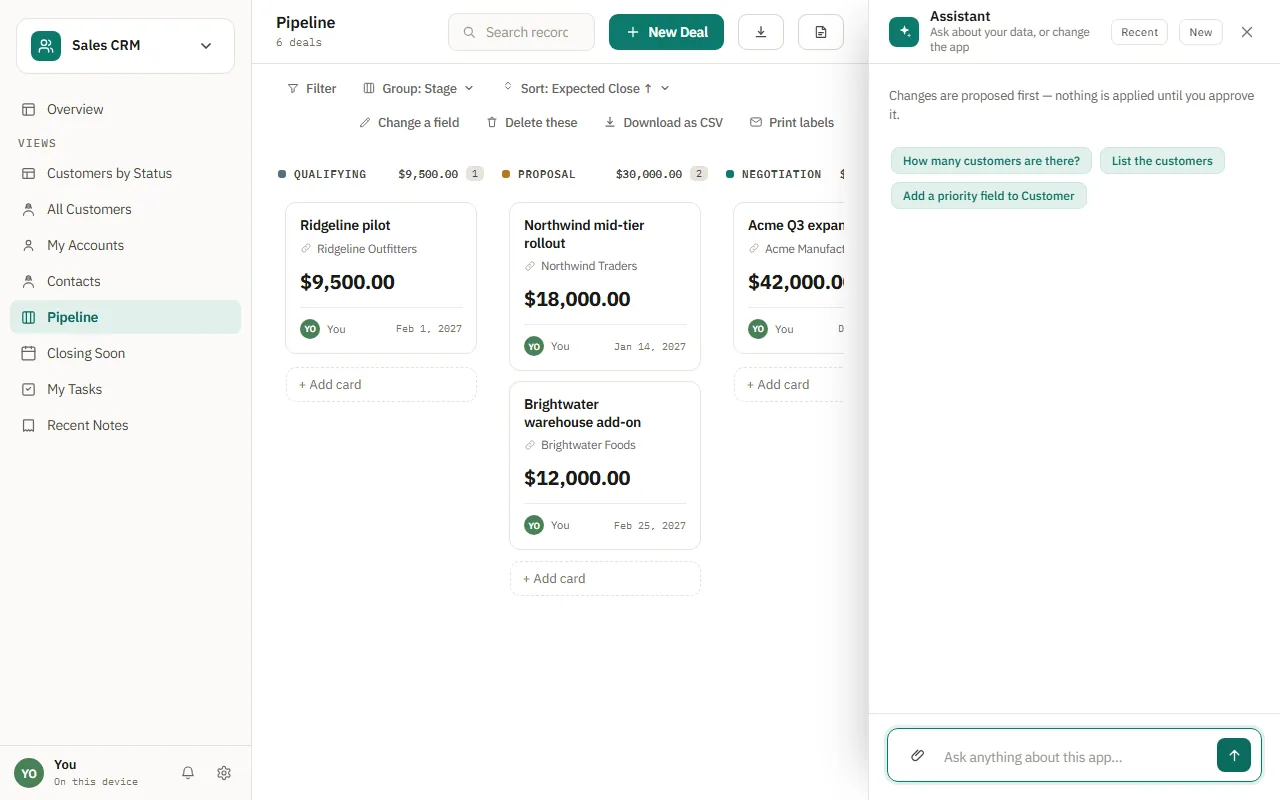
- The assistant, open beside the page you're on.
- Recent chats, or start a New one.
- Every change is proposed first. Nothing happens until you approve it.
- Ideas to start with. Press one to ask it.
- Ask anything. The paperclip hands it a file.
Ask it to change the app
Say what you want in plain words:
- "Add a Paid field to Jobs, yes or no."
- "Make a board of jobs by status."
- "Add a dashboard card with the total of unpaid invoices."
- "Each technician should only see their own jobs."
It answers with a proposal: a card listing every change in plain words.
- Apply makes the changes.
- Adjust lets you say what to change first.
- Dismiss throws it away. Nothing was changed.
It can add, change or remove fields, collections, views, dashboards and workflows, and set who sees what. It only touches who-sees-what when you ask it to.
Ask it to change records
"Mark every job from last week as paid." "Push all of Tuesday's bookings to Wednesday." "Delete everything I imported this morning." It shows you which records will change, and how, before you apply. Deleted records go to the Trash.
Ask it questions
"How many jobs are overdue?" "Which customer spent the most this year?" It reads your records to answer. It only sees the records you are allowed to see.
Hand it a file
Press the paperclip. It reads spreadsheets (CSV, Excel), Access databases, .dbf files, contacts (.vcf), and documents (PDF, Word, text, email). Ask it to bring the records in, or to build an app around them.
Ask it for a workflow
"Every Monday at 8am, email me everything that is overdue." It hands the sentence to the workflow builder and shows you the result to switch on. See Workflows.
AI inside workflows
A workflow can also use AI as one of its steps: read a new record and decide something. "When a support request comes in, ask AI how urgent it is: low, normal or urgent, and put the answer in Priority." You can limit the AI to a list of answers, so later steps can act on them.
Who can use it
- Anyone in the app can ask it questions.
- Editors can have it change records.
- Designers and above can have it change the app.
Your chats are saved, and private to you. Press Recent to go back to one, or New to start fresh.
Be specific about names. "Add a field" makes it guess. "Add a Date field called Next service to Vehicles" gets it right the first time.
Moving off Access, FileMaker or a big spreadsheet? Tell us what it does and we will build a working version for you. No fee and no card.